# Adafruit MQTT
# Pricipe MQTT
Het MQTT-protocol (Message Queuing Telemetry Transport) wordt zeer veel gebruikt in IoT toepassingen om sensordata te versturen en deze terug op te halen. MQTT maakt gebruik van een Broker. De clients zijn in staat om zowel data te publiceren als te abonneren (subscribe) bij een broker op data.
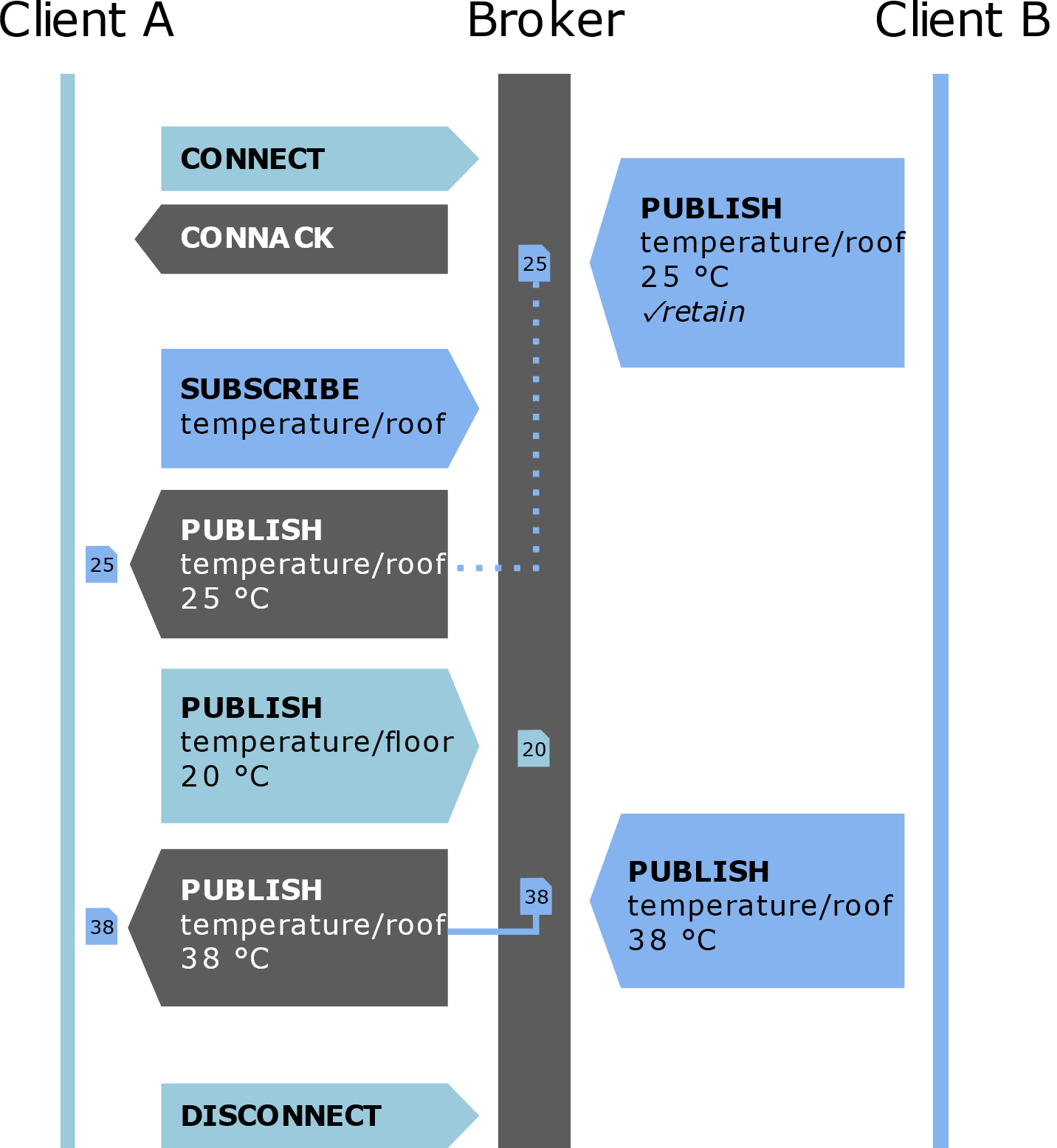
In bovenstaande voorbeeld publiceert client B de dak temperatuur in het topic temperature/roof en client A de vloer temperatuur in het topic temperature/floor. Client A is geabonneerd (subscribe) bij de broker op het topic temperature/roof afkomstig van client B.
Adafruit beschikt over een publieke MQTT broker waarvan de info weergegeven wordt in Adafruit.io.
# Code publiceren data
De code is zowel geschikt voor de ESP8266 als voor de ESP32.
Bij de ESP8266 wordt gebruik gemaakt van ESP8266WiFi.h, bij de ESP32 van WiFi.h. Het onderstaande voorbeeld is uitgewerkt voor de ESP32.
In de code wordt iedere 30 seconden een waarde wordt gepubliceerd in de feed "counter" van Adafruit.io.
Vul in onderstaande code de instellingen van het Wifi Access point in.
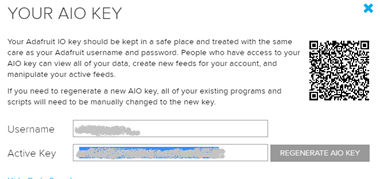
De IO username en de IO key zijn te vinden in het adafruit.io platform onder AIO key.

De IO_USERNAME is te vinden bij “Username” en IO_KEY is te vinden bij “Active Key”.
/***************************************************
  De code is gebaseerd op
  https://github.com/adafruit/Adafruit_MQTT_Library/blob/master/examples/mqtt_esp8266/mqtt_esp8266.ino
 ****************************************************/
#include <WiFi.h>
#include "Adafruit_MQTT.h"
#include "Adafruit_MQTT_Client.h"

/************************* WiFi Access Point *********************************/

#define WLAN_SSID       "...your SSID..."
#define WLAN_PASS       "...your password..."

/************************* Adafruit.io Setup *********************************/

#define AIO_SERVER      "io.adafruit.com"
#define AIO_SERVERPORT  1883                   // use 8883 for SSL
#define AIO_USERNAME    "...your AIO username (see https://accounts.adafruit.com)..."
#define AIO_KEY         "... your AIO key..."
#define IOT_UPDATE      30                     // send new message to adafruitMQTT every x seconds


unsigned long previousMillis = 0;        // will store last time there was an update
unsigned long currentMillis = 0;       // current time in millis

/************ Global State (you don't need to change this!) ******************/

// Create an WiFiClient class to connect to the MQTT server.
WiFiClient client;

// Setup the MQTT client class by passing in the WiFi client and MQTT server and login details.
Adafruit_MQTT_Client mqtt(&client, AIO_SERVER, AIO_SERVERPORT, AIO_USERNAME, AIO_KEY);

/****************************** Feeds ***************************************/

// Setup a feed called 'counter' for publishing.
// Notice MQTT paths for AIO follow the form: <username>/feeds/<feedname>
Adafruit_MQTT_Publish counter = Adafruit_MQTT_Publish(&mqtt, AIO_USERNAME "/feeds/counter");

/*************************** Sketch Code ************************************/

void MQTT_connect();

void setup() {
  Serial.begin(115200);
  delay(10);

  Serial.println(F("Adafruit MQTT demo"));

  // Connect to WiFi access point.
  Serial.println(); Serial.println();
  Serial.print("Connecting to ");
  Serial.println(WLAN_SSID);

  WiFi.begin(WLAN_SSID, WLAN_PASS);
  while (WiFi.status() != WL_CONNECTED) {
    delay(500);
    Serial.print(".");
  }
  Serial.println();

  Serial.println("WiFi connected");
  Serial.println("IP address: ");
  Serial.println(WiFi.localIP());

}

uint32_t x = 0;

void loop() {

  currentMillis = millis();
  if ((currentMillis - previousMillis) > IOT_UPDATE * 1000)
  { previousMillis = currentMillis;    //last time there was an update
    // Ensure the connection to the MQTT server is alive (this will make the first
    // connection and automatically reconnect when disconnected).  See the MQTT_connect
    // function definition further below.
    MQTT_connect();

    // Now we can publish stuff!
    Serial.print(F("\nSending counter val "));
    Serial.print(x);
    Serial.print("...");
    if (! counter.publish(x++)) {
      Serial.println(F("Failed"));
    } else {
      Serial.println(F("OK!"));
    }

    // ping the server to keep the mqtt connection alive
    // NOT required if you are publishing once every KEEPALIVE seconds

    if (! mqtt.ping()) {
      mqtt.disconnect();
    }

  }

}

// Function to connect and reconnect as necessary to the MQTT server.
// Should be called in the loop function and it will take care if connecting.
void MQTT_connect() {
  int8_t ret;

  // Stop if already connected.
  if (mqtt.connected()) {
    return;
  }

  Serial.print("Connecting to MQTT... ");

  uint8_t retries = 3;
  while ((ret = mqtt.connect()) != 0) { // connect will return 0 for connected
    Serial.println(mqtt.connectErrorString(ret));
    Serial.println("Retrying MQTT connection in 5 seconds...");
    mqtt.disconnect();
    delay(5000);  // wait 5 seconds
    retries--;
    if (retries == 0) {
      // basically die and wait for WDT to reset me
      while (1);
    }
  }
  Serial.println("MQTT Connected!");
}
2
3
4
5
6
7
8
9
10
11
12
13
14
15
16
17
18
19
20
21
22
23
24
25
26
27
28
29
30
31
32
33
34
35
36
37
38
39
40
41
42
43
44
45
46
47
48
49
50
51
52
53
54
55
56
57
58
59
60
61
62
63
64
65
66
67
68
69
70
71
72
73
74
75
76
77
78
79
80
81
82
83
84
85
86
87
88
89
90
91
92
93
94
95
96
97
98
99
100
101
102
103
104
105
106
107
108
109
110
111
112
113
114
115
116
117
118
119
120
121
122
123
124
125
126
127
# Opdrachten
- Geef de temperatuur weer afkomstig van een DS18B20 temperatuur sensor. Kies een logische naam voor de feed.
- Geef de temperatuur en luchtvochtigheid weer afkomstig van een DHT22 sensor. Hiervoor zijn 2 feeds nodig in Adafruit.io.
# Code subscribe (abonneren)
De code is zowel geschikt voor de ESP8266 als voor de ESP32.
Bij de ESP8266 wordt gebruik gemaakt van ESP8266WiFi.h, bij de ESP32 van WiFi.h. Het onderstaande voorbeeld is uitgewerkt voor de ESP32.
In de code wordt geabonneerd (subscribe) op de feeds "onoffbutton" en "slider". Maak hiervoor eerst deze feeds aan in Adafruit.io.
Vul in onderstaande code de instellingen van het Wifi Access point in.
De IO username en de IO key zijn te vinden in het adafruit.io platform onder AIO key.
De IO_USERNAME is te vinden bij “Username” en IO_KEY is te vinden bij “Active Key”.
/***************************************************
  Adafruit MQTT Library ESP8266 Example
  Must use ESP8266 Arduino from:
    https://github.com/esp8266/Arduino
  Works great with Adafruit's Huzzah ESP board & Feather
  ----> https://www.adafruit.com/product/2471
  ----> https://www.adafruit.com/products/2821
  Adafruit invests time and resources providing this open source code,
  please support Adafruit and open-source hardware by purchasing
  products from Adafruit!
  Written by Tony DiCola for Adafruit Industries.
  MIT license, all text above must be included in any redistribution
 ****************************************************/
#include <WiFi.h>
#include "Adafruit_MQTT.h"
#include "Adafruit_MQTT_Client.h"

// the on off button feed turns this LED on/off
#define LED 2
// the slider feed sets the PWM output of this pin
#define PWMOUT 12

/************************* WiFi Access Point *********************************/

#define WLAN_SSID       "...your SSID..."
#define WLAN_PASS       "...your password..."

/************************* Adafruit.io Setup *********************************/

#define AIO_SERVER      "io.adafruit.com"
#define AIO_SERVERPORT  1883                   // use 8883 for SSL
#define AIO_USERNAME    "...your AIO username (see https://accounts.adafruit.com)..."
#define AIO_KEY         "...your AIO key..."

/************ Global State (you don't need to change this!) ******************/

// Create an ESP8266 WiFiClient class to connect to the MQTT server.
WiFiClient client;
// or... use WiFiFlientSecure for SSL
//WiFiClientSecure client;

// Setup the MQTT client class by passing in the WiFi client and MQTT server and login details.
Adafruit_MQTT_Client mqtt(&client, AIO_SERVER, AIO_SERVERPORT, AIO_USERNAME, AIO_USERNAME, AIO_KEY);

/****************************** Feeds ***************************************/

// Notice MQTT paths for AIO follow the form: <username>/feeds/<feedname>
Adafruit_MQTT_Subscribe onoffbutton = Adafruit_MQTT_Subscribe(&mqtt, AIO_USERNAME "/feeds/onoff");
Adafruit_MQTT_Subscribe slider = Adafruit_MQTT_Subscribe(&mqtt, AIO_USERNAME "/feeds/slider");

/*************************** Sketch Code ************************************/

// Bug workaround for Arduino 1.6.6, it seems to need a function declaration
// for some reason (only affects ESP8266, likely an arduino-builder bug).
void MQTT_connect();

void setup() {
  pinMode(LED, OUTPUT);
  pinMode(PWMOUT, OUTPUT);

  Serial.begin(115200);
  delay(10);

  Serial.println(F("Adafruit MQTT demo"));

  // Connect to WiFi access point.
  Serial.println(); Serial.println();
  Serial.print("Connecting to ");
  Serial.println(WLAN_SSID);

  WiFi.begin(WLAN_SSID, WLAN_PASS);
  while (WiFi.status() != WL_CONNECTED) {
    delay(500);
    Serial.print(".");
  }
  Serial.println();

  Serial.println("WiFi connected");
  Serial.println("IP address: "); Serial.println(WiFi.localIP());

  // Setup MQTT subscription for onoff & slider feed.
  mqtt.subscribe(&onoffbutton);
  mqtt.subscribe(&slider);
}

uint32_t x=0;

void loop() {
  // Ensure the connection to the MQTT server is alive (this will make the first
  // connection and automatically reconnect when disconnected).  See the MQTT_connect
  // function definition further below.
  MQTT_connect();

  // this is our 'wait for incoming subscription packets' busy subloop
  // try to spend your time here

  Adafruit_MQTT_Subscribe *subscription;
  while ((subscription = mqtt.readSubscription(5000))) {
    // Check if its the onoff button feed
    if (subscription == &onoffbutton) {
      Serial.print(F("On-Off button: "));
      Serial.println((char *)onoffbutton.lastread);

      if (strcmp((char *)onoffbutton.lastread, "ON") == 0) {
        digitalWrite(LED, LOW);
      }
      if (strcmp((char *)onoffbutton.lastread, "OFF") == 0) {
        digitalWrite(LED, HIGH);
      }
    }

    // check if its the slider feed
    if (subscription == &slider) {
      Serial.print(F("Slider: "));
      Serial.println((char *)slider.lastread);
      uint16_t sliderval = atoi((char *)slider.lastread);  // convert to a number
      analogWrite(PWMOUT, sliderval);
    }
  }

  // ping the server to keep the mqtt connection alive
  if(! mqtt.ping()) {
    mqtt.disconnect();
  }

}

// Function to connect and reconnect as necessary to the MQTT server.
// Should be called in the loop function and it will take care if connecting.
void MQTT_connect() {
  int8_t ret;

  // Stop if already connected.
  if (mqtt.connected()) {
    return;
  }

  Serial.print("Connecting to MQTT... ");

  uint8_t retries = 3;
  while ((ret = mqtt.connect()) != 0) { // connect will return 0 for connected
       Serial.println(mqtt.connectErrorString(ret));
       Serial.println("Retrying MQTT connection in 5 seconds...");
       mqtt.disconnect();
       delay(5000);  // wait 5 seconds
       retries--;
       if (retries == 0) {
         // basically die and wait for WDT to reset me
         while (1);
       }
  }
  Serial.println("MQTT Connected!");
}
2
3
4
5
6
7
8
9
10
11
12
13
14
15
16
17
18
19
20
21
22
23
24
25
26
27
28
29
30
31
32
33
34
35
36
37
38
39
40
41
42
43
44
45
46
47
48
49
50
51
52
53
54
55
56
57
58
59
60
61
62
63
64
65
66
67
68
69
70
71
72
73
74
75
76
77
78
79
80
81
82
83
84
85
86
87
88
89
90
91
92
93
94
95
96
97
98
99
100
101
102
103
104
105
106
107
108
109
110
111
112
113
114
115
116
117
118
119
120
121
122
123
124
125
126
127
128
129
130
131
132
133
134
135
136
137
138
139
140
141
142
143
144
145
146
147
148
149
150
151
152
153
# Code beveiligd publiceren data
In voorgaande voorbeelden is er geen beveiliging aanwezig bij de communicatie tussen het IoT device en de MQTT broker van Adafruit. In onderstaande code wordt gebruik gemaakt van SSL (Secure Sockets Layer) en zijn opvolger TLS (Transport Layer Security). Deze protocollen bieden een reeks beveiligingsmechanismen om de vertrouwelijkheid, integriteit en authenticiteit van de gegevens tijdens hun overdracht te waarborgen. Dit wordt o.a. gerealiseerd met een root certificaat. Het is echter belangrijk na te zien als het root certificaat nog correct is zoals in de voorbeeldcode op: https://github.com/adafruit/Adafruit_MQTT_Library/blob/master/examples/adafruitio_secure_esp32/adafruitio_secure_esp32.ino
In de code wordt iedere 30 seconden een waarde wordt gepubliceerd in de feed "counter" van Adafruit.io.
Vul in onderstaande code de instellingen van het Wifi Access point in.
De IO username en de IO key zijn te vinden in het adafruit.io platform onder AIO key.
De IO_USERNAME is te vinden bij “Username” en IO_KEY is te vinden bij “Active Key”.
/***********************************************************************
  Adafruit MQTT Library ESP32 Adafruit IO SSL/TLS example

  Use the latest version of the ESP32 Arduino Core:
    https://github.com/espressif/arduino-esp32
  The code is based on:
    https://github.com/adafruit/Adafruit_MQTT_Library/blob/master/examples/adafruitio_secure_esp32/adafruitio_secure_esp32.ino

 **********************************************************************/
#include <WiFi.h>
#include "WiFiClientSecure.h"
#include "Adafruit_MQTT.h"
#include "Adafruit_MQTT_Client.h"

/************************* WiFi Access Point *********************************/

#define WLAN_SSID "WLAN_SSID"
#define WLAN_PASS "WIFI_PASSWORD"

/************************* Adafruit.io Setup *********************************/

#define AIO_SERVER      "io.adafruit.com"

// Using port 8883 for MQTTS
#define AIO_SERVERPORT  8883

// Adafruit IO Account Configuration
// (to obtain these values, visit https://io.adafruit.com and click on Active Key)
#define AIO_USERNAME "YOUR_ADAFRUIT_IO_USERNAME"
#define AIO_KEY      "YOUR_ADAFRUIT_IO_KEY"


/************************* Publish time ************************************/
unsigned long previousMillis = 0;        // will store last time there was an update
unsigned long currentMillis = 0;       // current time in millis
unsigned long publishTime = 30000;      //time in ms to publish data

/************ Global State (you don't need to change this!) ******************/

// WiFiFlientSecure for SSL/TLS support
WiFiClientSecure client;

// Setup the MQTT client class by passing in the WiFi client and MQTT server and login details.
Adafruit_MQTT_Client mqtt(&client, AIO_SERVER, AIO_SERVERPORT, AIO_USERNAME, AIO_KEY);

// io.adafruit.com root CA
const char* adafruitio_root_ca = \
                                 "-----BEGIN CERTIFICATE-----\n"
                                 "MIIEjTCCA3WgAwIBAgIQDQd4KhM/xvmlcpbhMf/ReTANBgkqhkiG9w0BAQsFADBh\n"
                                 "MQswCQYDVQQGEwJVUzEVMBMGA1UEChMMRGlnaUNlcnQgSW5jMRkwFwYDVQQLExB3\n"
                                 "d3cuZGlnaWNlcnQuY29tMSAwHgYDVQQDExdEaWdpQ2VydCBHbG9iYWwgUm9vdCBH\n"
                                 "MjAeFw0xNzExMDIxMjIzMzdaFw0yNzExMDIxMjIzMzdaMGAxCzAJBgNVBAYTAlVT\n"
                                 "MRUwEwYDVQQKEwxEaWdpQ2VydCBJbmMxGTAXBgNVBAsTEHd3dy5kaWdpY2VydC5j\n"
                                 "b20xHzAdBgNVBAMTFkdlb1RydXN0IFRMUyBSU0EgQ0EgRzEwggEiMA0GCSqGSIb3\n"
                                 "DQEBAQUAA4IBDwAwggEKAoIBAQC+F+jsvikKy/65LWEx/TMkCDIuWegh1Ngwvm4Q\n"
                                 "yISgP7oU5d79eoySG3vOhC3w/3jEMuipoH1fBtp7m0tTpsYbAhch4XA7rfuD6whU\n"
                                 "gajeErLVxoiWMPkC/DnUvbgi74BJmdBiuGHQSd7LwsuXpTEGG9fYXcbTVN5SATYq\n"
                                 "DfbexbYxTMwVJWoVb6lrBEgM3gBBqiiAiy800xu1Nq07JdCIQkBsNpFtZbIZhsDS\n"
                                 "fzlGWP4wEmBQ3O67c+ZXkFr2DcrXBEtHam80Gp2SNhou2U5U7UesDL/xgLK6/0d7\n"
                                 "6TnEVMSUVJkZ8VeZr+IUIlvoLrtjLbqugb0T3OYXW+CQU0kBAgMBAAGjggFAMIIB\n"
                                 "PDAdBgNVHQ4EFgQUlE/UXYvkpOKmgP792PkA76O+AlcwHwYDVR0jBBgwFoAUTiJU\n"
                                 "IBiV5uNu5g/6+rkS7QYXjzkwDgYDVR0PAQH/BAQDAgGGMB0GA1UdJQQWMBQGCCsG\n"
                                 "AQUFBwMBBggrBgEFBQcDAjASBgNVHRMBAf8ECDAGAQH/AgEAMDQGCCsGAQUFBwEB\n"
                                 "BCgwJjAkBggrBgEFBQcwAYYYaHR0cDovL29jc3AuZGlnaWNlcnQuY29tMEIGA1Ud\n"
                                 "HwQ7MDkwN6A1oDOGMWh0dHA6Ly9jcmwzLmRpZ2ljZXJ0LmNvbS9EaWdpQ2VydEds\n"
                                 "b2JhbFJvb3RHMi5jcmwwPQYDVR0gBDYwNDAyBgRVHSAAMCowKAYIKwYBBQUHAgEW\n"
                                 "HGh0dHBzOi8vd3d3LmRpZ2ljZXJ0LmNvbS9DUFMwDQYJKoZIhvcNAQELBQADggEB\n"
                                 "AIIcBDqC6cWpyGUSXAjjAcYwsK4iiGF7KweG97i1RJz1kwZhRoo6orU1JtBYnjzB\n"
                                 "c4+/sXmnHJk3mlPyL1xuIAt9sMeC7+vreRIF5wFBC0MCN5sbHwhNN1JzKbifNeP5\n"
                                 "ozpZdQFmkCo+neBiKR6HqIA+LMTMCMMuv2khGGuPHmtDze4GmEGZtYLyF8EQpa5Y\n"
                                 "jPuV6k2Cr/N3XxFpT3hRpt/3usU/Zb9wfKPtWpoznZ4/44c1p9rzFcZYrWkj3A+7\n"
                                 "TNBJE0GmP2fhXhP1D/XVfIW/h0yCJGEiV9Glm/uGOa3DXHlmbAcxSyCRraG+ZBkA\n"
                                 "7h4SeM6Y8l/7MBRpPCz6l8Y=\n"
                                 "-----END CERTIFICATE-----\n";

/****************************** Feeds ***************************************/

// Setup a feed called 'counter' for publishing.
// Notice MQTT paths for AIO follow the form: <username>/feeds/<feedname>
Adafruit_MQTT_Publish test = Adafruit_MQTT_Publish(&mqtt, AIO_USERNAME "/feeds/counter");

/*************************** Sketch Code ************************************/

void setup() {
  Serial.begin(115200);
  delay(10);

  Serial.println(F("Adafruit IO MQTTS (SSL/TLS) Example"));

  // Connect to WiFi access point.
  Serial.println(); Serial.println();
  Serial.print("Connecting to ");
  Serial.println(WLAN_SSID);

  delay(1000);

  WiFi.begin(WLAN_SSID, WLAN_PASS);
  delay(2000);

  while (WiFi.status() != WL_CONNECTED) {
    delay(500);
    Serial.print(".");
  }
  Serial.println();

  Serial.println("WiFi connected");
  Serial.println("IP address: "); Serial.println(WiFi.localIP());

  // Set Adafruit IO's root CA
  client.setCACert(adafruitio_root_ca);
}

uint32_t x = 0;

void loop() {


  currentMillis = millis();
  if ((currentMillis - previousMillis) > publishTime)
  { previousMillis = currentMillis;    //last time there was an update

    // Ensure the connection to the MQTT server is alive (this will make the first
    // connection and automatically reconnect when disconnected).  See the MQTT_connect
    // function definition further below.
    MQTT_connect();

    // Now we can publish stuff!
    Serial.print(F("\nSending val "));
    Serial.print(x);
    Serial.print(F(" to counter feed..."));
    if (! test.publish(x++)) {
      Serial.println(F("Failed"));
    } else {
      Serial.println(F("OK!"));
    }
  }

}

// Function to connect and reconnect as necessary to the MQTT server.
// Should be called in the loop function and it will take care if connecting.
void MQTT_connect() {
  int8_t ret;

  // Stop if already connected.
  if (mqtt.connected()) {
    return;
  }

  Serial.print("Connecting to MQTT... ");

  uint8_t retries = 3;
  while ((ret = mqtt.connect()) != 0) { // connect will return 0 for connected
    Serial.println(mqtt.connectErrorString(ret));
    Serial.println("Retrying MQTT connection in 5 seconds...");
    mqtt.disconnect();
    delay(5000);  // wait 5 seconds
    retries--;
    if (retries == 0) {
      // basically die and wait for WDT to reset me
      while (1);
    }
  }

  Serial.println("MQTT Connected!");
}
2
3
4
5
6
7
8
9
10
11
12
13
14
15
16
17
18
19
20
21
22
23
24
25
26
27
28
29
30
31
32
33
34
35
36
37
38
39
40
41
42
43
44
45
46
47
48
49
50
51
52
53
54
55
56
57
58
59
60
61
62
63
64
65
66
67
68
69
70
71
72
73
74
75
76
77
78
79
80
81
82
83
84
85
86
87
88
89
90
91
92
93
94
95
96
97
98
99
100
101
102
103
104
105
106
107
108
109
110
111
112
113
114
115
116
117
118
119
120
121
122
123
124
125
126
127
128
129
130
131
132
133
134
135
136
137
138
139
140
141
142
143
144
145
146
147
148
149
150
151
152
153
154
155
156
157
158
159
160
161
162
163
164
165
166
167
168
# Code beveiligd subscribe (abonneren)
In de code wordt beveiligd geabonneerd (subscribe) op de feed "counter". Maak hiervoor eerst deze feeds aan in Adafruit.io.
Vul in onderstaande code de instellingen van het Wifi Access point in.
De IO username en de IO key zijn te vinden in het adafruit.io platform onder AIO key.
De IO_USERNAME is te vinden bij “Username” en IO_KEY is te vinden bij “Active Key”.
/***********************************************************************
  Adafruit MQTT Library ESP32 Adafruit IO SSL/TLS example

  Use the latest version of the ESP32 Arduino Core:
    https://github.com/espressif/arduino-esp32

 **********************************************************************/
#include <WiFi.h>
#include "WiFiClientSecure.h"
#include "Adafruit_MQTT.h"
#include "Adafruit_MQTT_Client.h"

/************************* WiFi Access Point *********************************/

#define WLAN_SSID "WLAN_SSID"
#define WLAN_PASS "WIFI_PASSWORD"


/************************* Adafruit.io Setup *********************************/

#define AIO_SERVER      "io.adafruit.com"

// Using port 8883 for MQTTS
#define AIO_SERVERPORT  8883

// Adafruit IO Account Configuration
// (to obtain these values, visit https://io.adafruit.com and click on Active Key)
#define AIO_USERNAME "YOUR_ADAFRUIT_IO_USERNAME"
#define AIO_KEY      "YOUR_ADAFRUIT_IO_KEY"

/************ Global State (you don't need to change this!) ******************/

// WiFiFlientSecure for SSL/TLS support
WiFiClientSecure client;

// Setup the MQTT client class by passing in the WiFi client and MQTT server and login details.
Adafruit_MQTT_Client mqtt(&client, AIO_SERVER, AIO_SERVERPORT, AIO_USERNAME, AIO_KEY);

// io.adafruit.com root CA
const char* adafruitio_root_ca = \
                                 "-----BEGIN CERTIFICATE-----\n"
                                 "MIIEjTCCA3WgAwIBAgIQDQd4KhM/xvmlcpbhMf/ReTANBgkqhkiG9w0BAQsFADBh\n"
                                 "MQswCQYDVQQGEwJVUzEVMBMGA1UEChMMRGlnaUNlcnQgSW5jMRkwFwYDVQQLExB3\n"
                                 "d3cuZGlnaWNlcnQuY29tMSAwHgYDVQQDExdEaWdpQ2VydCBHbG9iYWwgUm9vdCBH\n"
                                 "MjAeFw0xNzExMDIxMjIzMzdaFw0yNzExMDIxMjIzMzdaMGAxCzAJBgNVBAYTAlVT\n"
                                 "MRUwEwYDVQQKEwxEaWdpQ2VydCBJbmMxGTAXBgNVBAsTEHd3dy5kaWdpY2VydC5j\n"
                                 "b20xHzAdBgNVBAMTFkdlb1RydXN0IFRMUyBSU0EgQ0EgRzEwggEiMA0GCSqGSIb3\n"
                                 "DQEBAQUAA4IBDwAwggEKAoIBAQC+F+jsvikKy/65LWEx/TMkCDIuWegh1Ngwvm4Q\n"
                                 "yISgP7oU5d79eoySG3vOhC3w/3jEMuipoH1fBtp7m0tTpsYbAhch4XA7rfuD6whU\n"
                                 "gajeErLVxoiWMPkC/DnUvbgi74BJmdBiuGHQSd7LwsuXpTEGG9fYXcbTVN5SATYq\n"
                                 "DfbexbYxTMwVJWoVb6lrBEgM3gBBqiiAiy800xu1Nq07JdCIQkBsNpFtZbIZhsDS\n"
                                 "fzlGWP4wEmBQ3O67c+ZXkFr2DcrXBEtHam80Gp2SNhou2U5U7UesDL/xgLK6/0d7\n"
                                 "6TnEVMSUVJkZ8VeZr+IUIlvoLrtjLbqugb0T3OYXW+CQU0kBAgMBAAGjggFAMIIB\n"
                                 "PDAdBgNVHQ4EFgQUlE/UXYvkpOKmgP792PkA76O+AlcwHwYDVR0jBBgwFoAUTiJU\n"
                                 "IBiV5uNu5g/6+rkS7QYXjzkwDgYDVR0PAQH/BAQDAgGGMB0GA1UdJQQWMBQGCCsG\n"
                                 "AQUFBwMBBggrBgEFBQcDAjASBgNVHRMBAf8ECDAGAQH/AgEAMDQGCCsGAQUFBwEB\n"
                                 "BCgwJjAkBggrBgEFBQcwAYYYaHR0cDovL29jc3AuZGlnaWNlcnQuY29tMEIGA1Ud\n"
                                 "HwQ7MDkwN6A1oDOGMWh0dHA6Ly9jcmwzLmRpZ2ljZXJ0LmNvbS9EaWdpQ2VydEds\n"
                                 "b2JhbFJvb3RHMi5jcmwwPQYDVR0gBDYwNDAyBgRVHSAAMCowKAYIKwYBBQUHAgEW\n"
                                 "HGh0dHBzOi8vd3d3LmRpZ2ljZXJ0LmNvbS9DUFMwDQYJKoZIhvcNAQELBQADggEB\n"
                                 "AIIcBDqC6cWpyGUSXAjjAcYwsK4iiGF7KweG97i1RJz1kwZhRoo6orU1JtBYnjzB\n"
                                 "c4+/sXmnHJk3mlPyL1xuIAt9sMeC7+vreRIF5wFBC0MCN5sbHwhNN1JzKbifNeP5\n"
                                 "ozpZdQFmkCo+neBiKR6HqIA+LMTMCMMuv2khGGuPHmtDze4GmEGZtYLyF8EQpa5Y\n"
                                 "jPuV6k2Cr/N3XxFpT3hRpt/3usU/Zb9wfKPtWpoznZ4/44c1p9rzFcZYrWkj3A+7\n"
                                 "TNBJE0GmP2fhXhP1D/XVfIW/h0yCJGEiV9Glm/uGOa3DXHlmbAcxSyCRraG+ZBkA\n"
                                 "7h4SeM6Y8l/7MBRpPCz6l8Y=\n"
                                 "-----END CERTIFICATE-----\n";

/****************************** Feeds ***************************************/

//Setup subscribe 'counter' feed

Adafruit_MQTT_Subscribe counter = Adafruit_MQTT_Subscribe(&mqtt, AIO_USERNAME "/feeds/counter");

/*************************** Sketch Code ************************************/

void setup() {
  Serial.begin(115200);
  delay(10);

  Serial.println(F("Adafruit IO MQTTS (SSL/TLS) Example"));

  // Connect to WiFi access point.
  Serial.println(); Serial.println();
  Serial.print("Connecting to ");
  Serial.println(WLAN_SSID);

  delay(1000);

  WiFi.begin(WLAN_SSID, WLAN_PASS);
  delay(2000);

  while (WiFi.status() != WL_CONNECTED) {
    delay(500);
    Serial.print(".");
  }
  Serial.println();

  Serial.println("WiFi connected");
  Serial.println("IP address: "); Serial.println(WiFi.localIP());

  // Set Adafruit IO's root CA
  client.setCACert(adafruitio_root_ca);

  // Setup MQTT subscription for "counter" feed.
  mqtt.subscribe(&counter);
}

uint32_t x = 0;

void loop() {
  // Ensure the connection to the MQTT server is alive (this will make the first
  // connection and automatically reconnect when disconnected).  See the MQTT_connect
  // function definition further below.
  MQTT_connect();


  Adafruit_MQTT_Subscribe *subscription;
  while ((subscription = mqtt.readSubscription(5000))) {
    if (subscription == &counter) {
      Serial.print(F("counter: "));
      Serial.println((char *)counter.lastread);
    }
  }
}

// Function to connect and reconnect as necessary to the MQTT server.
// Should be called in the loop function and it will take care if connecting.
void MQTT_connect() {
  int8_t ret;

  // Stop if already connected.
  if (mqtt.connected()) {
    return;
  }

  Serial.print("Connecting to MQTT... ");

  uint8_t retries = 3;
  while ((ret = mqtt.connect()) != 0) { // connect will return 0 for connected
    Serial.println(mqtt.connectErrorString(ret));
    Serial.println("Retrying MQTT connection in 5 seconds...");
    mqtt.disconnect();
    delay(5000);  // wait 5 seconds
    retries--;
    if (retries == 0) {
      // basically die and wait for WDT to reset me
      while (1);
    }
  }

  Serial.println("MQTT Connected!");
}
2
3
4
5
6
7
8
9
10
11
12
13
14
15
16
17
18
19
20
21
22
23
24
25
26
27
28
29
30
31
32
33
34
35
36
37
38
39
40
41
42
43
44
45
46
47
48
49
50
51
52
53
54
55
56
57
58
59
60
61
62
63
64
65
66
67
68
69
70
71
72
73
74
75
76
77
78
79
80
81
82
83
84
85
86
87
88
89
90
91
92
93
94
95
96
97
98
99
100
101
102
103
104
105
106
107
108
109
110
111
112
113
114
115
116
117
118
119
120
121
122
123
124
125
126
127
128
129
130
131
132
133
134
135
136
137
138
139
140
141
142
143
144
145
146
147
148
149
150
151
152
153
154
155
156